
Spaces:
Sleeping

Sleeping
File size: 29,439 Bytes
92ea014 4588d9f 92ea014 4588d9f 92ea014 a131b22 92ea014 a131b22 92ea014 2963ab1 67620c7 77f13b2 8d41069 77f13b2 c5b0f48 91add32 77f13b2 fa56a2a e7d6e7f 72fb42c 861076c e7d6e7f fa56a2a 72fb42c 7d4db27 22bf7e8 e456e52 224b0e3 22bf7e8 7d4db27 22bf7e8 4564044 22bf7e8 92ea014 7d4db27 22bf7e8 7d4db27 54c27c6 22bf7e8 92ea014 22bf7e8 92ea014 22bf7e8 7d4db27 94c83ab 7d4db27 92559f9 f0bc04c e456e52 224b0e3 92559f9 7d4db27 6f1a2cd 7d4db27 93f8023 ba84185 93f8023 7d4db27 6f1a2cd 224b0e3 7d4db27 26ecd96 92559f9 099fa33 92559f9 b34b7fc 92ea014 0c43978 92559f9 0c43978 92559f9 94c83ab b34b7fc 94c83ab b34b7fc 77f13b2 3664f53 77f13b2 03ad6de 7d4db27 03ad6de 77f13b2 7d4db27 92559f9 |
1 2 3 4 5 6 7 8 9 10 11 12 13 14 15 16 17 18 19 20 21 22 23 24 25 26 27 28 29 30 31 32 33 34 35 36 37 38 39 40 41 42 43 44 45 46 47 48 49 50 51 52 53 54 55 56 57 58 59 60 61 62 63 64 65 66 67 68 69 70 71 72 73 74 75 76 77 78 79 80 81 82 83 84 85 86 87 88 89 90 91 92 93 94 95 96 97 98 99 100 101 102 103 104 105 106 107 108 109 110 111 112 113 114 115 116 117 118 119 120 121 122 123 124 125 126 127 128 129 130 131 132 133 134 135 136 137 138 139 140 141 142 143 144 145 146 147 148 149 150 151 152 153 154 155 156 157 158 159 160 161 162 163 164 165 166 167 168 169 170 171 172 173 174 175 176 177 178 179 180 181 182 183 184 185 186 187 188 189 190 191 192 193 194 195 196 197 198 199 200 201 202 203 204 205 206 207 208 209 210 211 212 213 214 215 216 217 218 219 220 221 222 223 224 225 226 227 228 229 230 231 232 233 234 235 236 237 238 239 240 241 242 243 244 245 246 247 248 249 250 251 252 253 254 255 256 257 258 259 260 261 262 263 264 265 266 267 268 269 270 271 272 273 274 275 276 277 278 279 280 281 282 283 284 285 286 287 288 289 290 291 292 293 294 295 296 297 298 299 300 301 302 303 304 305 306 307 308 309 310 311 312 313 314 315 316 317 318 319 320 321 322 323 324 325 326 327 328 329 330 331 332 333 334 335 336 337 338 339 340 341 342 343 344 345 346 347 348 349 350 351 352 353 354 355 356 357 358 359 360 361 362 363 364 365 366 367 368 369 370 371 372 373 374 375 376 377 378 379 380 381 382 383 384 385 386 387 388 389 390 391 392 393 394 395 396 397 398 399 400 401 402 403 404 405 406 407 408 409 410 411 412 413 414 415 416 417 418 419 420 421 422 423 424 425 426 427 428 429 430 431 432 433 434 435 436 437 438 439 440 441 442 443 444 445 446 447 448 449 450 451 452 453 454 455 456 457 458 459 460 461 462 463 464 465 466 467 468 469 470 471 472 473 474 475 476 477 478 479 480 481 482 483 484 485 486 487 488 489 490 491 492 493 494 495 496 497 498 499 500 501 502 503 504 505 506 507 508 509 510 511 512 513 514 515 516 517 518 519 520 521 522 523 524 525 526 527 528 529 530 531 532 533 534 535 536 537 538 539 540 541 542 543 544 545 546 547 548 549 550 551 552 553 554 555 556 557 558 559 560 561 562 563 564 565 566 567 568 569 570 571 572 573 574 575 576 577 578 579 580 581 582 583 584 585 586 587 588 589 590 591 592 593 594 595 596 597 598 599 600 601 602 603 604 605 606 607 608 609 610 611 612 613 614 615 616 617 618 619 620 621 622 623 624 625 626 627 628 629 630 631 632 633 634 635 636 637 638 639 640 641 642 643 644 645 646 647 648 649 650 651 652 653 654 655 656 657 658 659 660 661 662 663 664 665 666 667 668 669 670 671 672 673 674 675 676 677 678 679 680 681 682 683 684 685 686 687 688 689 690 691 692 693 694 695 696 697 698 699 700 701 702 703 704 705 706 707 708 709 710 711 712 |
---
title: Theorem Explanation Agent
emoji: 🎓
colorFrom: blue
colorTo: purple
sdk: gradio
sdk_version: 4.44.0
app_file: app.py
pinned: false
license: mit
python_version: 3.11
---
# 🎓 Theorem Explanation Agent
**AI-Powered Educational Content Generation**
[](https://huggingface.co/spaces/ManojINaik/menamiai)
## 🌟 Overview
The Theorem Explanation Agent is an AI-powered system that helps create educational content using Google's Gemini 2.0 Flash model. This system is designed to plan and structure educational videos with mathematical and scientific concepts.
## 🎮 Current Status: Demo Mode
**This Hugging Face Spaces instance runs in demonstration mode** due to system dependency limitations.
### ✅ Available Features:
- 🤖 **Gemini 2.0 Flash Integration**: Advanced AI for educational content planning
- 🔄 **Comma-separated API Key Support**: Automatic rotation across multiple API keys
- 📚 **Educational Content Planning**: Structured lesson planning and curriculum design
- 🎯 **Learning Objective Design**: AI-assisted educational goal setting
### ❌ Currently Not Available:
- 🎥 **Video Rendering**: Requires Manim system libraries (pangocairo, etc.)
- 📹 **MP4 Generation**: System dependencies not available in HF Spaces
- 🎨 **Visual Animations**: Manim-based mathematical visualizations
## 🚀 Quick Start
1. **Enter an Educational Topic**: e.g., "Pythagorean Theorem", "Newton's Laws"
2. **Add Learning Context**: Specify target audience, objectives, or focus areas
3. **Set Content Sections**: Choose number of content sections to plan (1-6)
4. **Generate**: Click "Generate Educational Content" to see AI planning in action
## 🔧 API Key Configuration
For enhanced functionality, set your Gemini API key:
### Single API Key:
```bash
GEMINI_API_KEY=your-gemini-api-key
```
### Multiple Keys (Recommended):
```bash
GEMINI_API_KEY=key1,key2,key3,key4
```
Multiple keys enable:
- ✅ Load balancing across API limits
- ✅ Automatic failover if one key fails
- ✅ Cost distribution across billing accounts
## 💻 Full Video Generation (Local Setup)
For complete video generation capabilities with actual MP4 output:
```bash
# Clone the repository
git clone https://github.com/your-repo/TheoremExplainAgent
cd TheoremExplainAgent
# Install system dependencies (Ubuntu/Debian)
sudo apt update
sudo apt install -y \
libpangocairo-1.0-0 \
libpango-1.0-0 \
libcairo2-dev \
pkg-config \
python3-dev
# Install Python dependencies
pip install -r requirements.txt
# Set environment variables
export GEMINI_API_KEY="your-api-key-1,your-api-key-2"
export DEMO_MODE=false
# Run locally
python app.py
```
## 📚 Example Educational Topics
The system works best with specific, educational topics:
- **Mathematics**: "Quadratic Formula Derivation", "Calculus Derivatives", "Geometric Proofs"
- **Physics**: "Newton's Second Law", "Electromagnetic Waves", "Wave-Particle Duality"
- **Biology**: "DNA Structure", "Photosynthesis Process", "Cellular Respiration"
- **Chemistry**: "Chemical Bonding", "Atomic Structure", "Periodic Trends"
## 🛠️ Technical Architecture
### Core Components:
- **Gemini 2.0 Flash**: Content planning and educational structure generation
- **LiteLLM**: Multi-provider AI model integration with failover
- **Gradio**: User-friendly web interface
- **Manim**: Mathematical animation engine (local setup only)
### Key Features:
- **Intelligent Content Planning**: AI-driven educational curriculum design
- **Multi-API Key Rotation**: Robust handling of rate limits and failures
- **Educational Focus**: Optimized for STEM learning objectives
- **Scalable Architecture**: Supports both demo and full production modes
## 🔍 System Capabilities
### Content Planning Features:
- 📋 **Curriculum Structure**: AI-generated lesson plans
- 🎯 **Learning Objectives**: Automatic educational goal setting
- 📊 **Content Progression**: Logical topic flow and difficulty scaling
- 🧠 **Concept Mapping**: Relationship identification between topics
### AI Integration:
- 🤖 **Gemini 2.0 Flash**: Latest Google AI model for educational content
- 🔄 **Automatic Retry Logic**: Robust error handling and recovery
- 📝 **Context-Aware Planning**: Audience-specific content adaptation
- 💡 **Creative Content Generation**: Engaging educational narratives
## 📈 Usage Analytics
The system provides insights into:
- ✅ Successful content generation attempts
- 🔄 API key rotation and usage patterns
- 📊 Popular educational topics and trends
- ⚡ Performance metrics and response times
## 🤝 Contributing
We welcome contributions to improve educational content generation:
1. **Content Templates**: Add new educational topic templates
2. **AI Prompts**: Enhance content planning prompts
3. **UI Improvements**: Better user experience design
4. **Documentation**: Clearer setup and usage guides
## 📞 Support
For questions, issues, or feedback:
- 🐛 **Issues**: Report bugs and feature requests
- 💬 **Discussions**: Community support and ideas
- 📧 **Contact**: Direct support for urgent matters
## 📄 License
This project is licensed under the MIT License - see the LICENSE file for details.
---
**Built with ❤️ for educators and learners worldwide**
*Transform complex concepts into engaging educational experiences with AI-powered content generation.*
# 🌟 Features
- **Interactive Web Interface**: User-friendly Gradio interface for easy video generation
- **Multiple AI Models**: Support for various LLMs including Gemini, GPT-4, and Claude
- **Automated Video Generation**: Creates complete educational videos with animations and voiceovers
- **API Endpoints**: RESTful API for programmatic access
- **Real-time Progress Tracking**: Monitor video generation status in real-time
- **Educational Content**: Covers mathematics, physics, and other STEM topics
## 🚀 Quick Start
### Using the Web Interface
1. **Initialize the System**: Click "Initialize System" to set up the video generator
2. **Enter Topic**: Provide the topic you want explained (e.g., "velocity", "Pythagorean theorem")
3. **Add Context**: Optionally provide additional context or specific requirements
4. **Select Models**: Choose your preferred AI models for generation
5. **Generate Video**: Click "Generate Video" and monitor the progress
6. **Download Results**: Access generated videos from the output directory
### Using the API
The application provides RESTful API endpoints for programmatic access:
```python
import requests
# Generate a video
response = requests.post("http://localhost:7860/api/generate", json={
"topic": "velocity",
"context": "explain with detailed examples",
"model": "gemini/gemini-2.0-flash",
"max_scenes": 5
})
# Check status
session_id = response.json()["session_id"]
status = requests.get(f"http://localhost:7860/api/status/{session_id}")
```
## 🛠️ Installation & Setup
### Local Development
1. **Clone the Repository**:
```bash
git clone https://github.com/your-repo/theorem-explain-agent.git
cd theorem-explain-agent
```
2. **Install Dependencies**:
```bash
pip install -r requirements.txt
```
3. **Set Up Environment Variables**:
```bash
cp .env.template .env
# Edit .env with your API keys
```
4. **Run the Application**:
```bash
python app.py
```
### Docker Deployment
```bash
docker build -t theorem-explanation-agent .
docker run -p 7860:7860 theorem-explanation-agent
```
### Hugging Face Spaces
This application is deployed on Hugging Face Spaces and can be accessed directly through the web interface. Simply visit the space URL and start generating educational videos!
## 🔧 Configuration
### Environment Variables
- `GEMINI_API_KEY`: Google Gemini API key (supports comma-separated multiple keys)
- `OPENAI_API_KEY`: OpenAI API key
- `ANTHROPIC_API_KEY`: Anthropic Claude API key
- `ELEVENLABS_API_KEY`: ElevenLabs TTS API key
- `ELEVENLABS_DEFAULT_VOICE_ID`: Default voice ID for TTS
### Model Support
The application supports various AI models:
- **Gemini Models**: `gemini/gemini-2.0-flash`, `gemini/gemini-1.5-pro`
- **OpenAI Models**: `openai/gpt-4o`, `openai/gpt-4`
- **Anthropic Models**: `anthropic/claude-3-sonnet`, `anthropic/claude-3-haiku`
## 📖 API Documentation
### Endpoints
#### POST `/api/generate`
Generate an educational video for a given topic.
**Request Body**:
```json
{
"topic": "string",
"context": "string (optional)",
"model": "string",
"max_scenes": "integer"
}
```
**Response**:
```json
{
"success": true,
"session_id": "string",
"message": "string"
}
```
#### GET `/api/status/{session_id}`
Check the status of video generation.
**Response**:
```json
{
"status": "string",
"progress": "integer",
"message": "string",
"result": "object (when completed)"
}
```
## 🎯 Example Topics
- **Mathematics**: Pythagorean Theorem, Quadratic Formula, Derivatives, Logarithms
- **Physics**: Velocity, Newton's Laws, Wave Motion, Thermodynamics
- **Statistics**: Probability, Normal Distribution, Hypothesis Testing
- **Geometry**: Circle Properties, Triangle Theorems, Transformations
## 🏗️ Architecture
The application consists of several components:
1. **Video Generator**: Core engine for planning and generating educational content
2. **Code Generator**: Creates Manim animation code from AI-generated plans
3. **Video Renderer**: Renders Manim animations into video files
4. **TTS Service**: Generates voiceovers using ElevenLabs API
5. **Web Interface**: Gradio-based user interface
6. **API Layer**: RESTful endpoints for programmatic access
## 🐛 Troubleshooting
### Common Issues
1. **Manim Rendering Errors**:
- Ensure all system dependencies are installed (FFmpeg, LaTeX, Cairo)
- Check that frame constants are properly defined in generated code
2. **TTS Connection Issues**:
- Verify ElevenLabs API key is valid
- Check network connectivity
- The system will fallback to silent audio if TTS fails
3. **Model API Errors**:
- Confirm API keys are set correctly
- Check API rate limits and quotas
- Ensure model names are valid
### Error Recovery
The application includes robust error handling:
- Automatic retries for API failures
- Fallback mechanisms for TTS issues
- Comprehensive error logging
- Graceful degradation when services are unavailable
## 🤝 Contributing
We welcome contributions! Please see our [Contributing Guide](CONTRIBUTING.md) for details.
## 📄 License
This project is licensed under the MIT License - see the [LICENSE](LICENSE) file for details.
## 🙏 Acknowledgments
- [Manim Community](https://www.manim.community/) for the animation framework
- [ElevenLabs](https://elevenlabs.io/) for text-to-speech services
- [Gradio](https://gradio.app/) for the web interface framework
- [Hugging Face](https://huggingface.co/) for hosting and deployment
# TheoremExplainAgent (TEA) 🍵
[](https://arxiv.org/abs/2502.19400)
<a href='https://huggingface.co/papers/2502.19400'><img src='https://img.shields.io/static/v1?label=Paper&message=Huggingface&color=orange'></a>
[**🌐 Homepage**](https://tiger-ai-lab.github.io/TheoremExplainAgent/) | [**📖 arXiv**](https://arxiv.org/abs/2502.19400) | [**🤗 HuggingFace Dataset**](https://huggingface.co/datasets/TIGER-Lab/TheoremExplainBench) | [🎥Video Data](https://drive.google.com/file/d/18kmzXvbxaFGyJw-g51jnq9m93v_ez4aJ/view)
[](https://github.com/TIGER-AI-Lab/TheoremExplainAgent/graphs/contributors)
[](https://github.com/TIGER-AI-Lab/TheoremExplainAgent/blob/main/LICENSE)
[](https://github.com/TIGER-AI-Lab/TheoremExplainAgent)
[](https://hits.seeyoufarm.com)
This repo contains the codebase for our paper [TheoremExplainAgent: Towards Video-based Multimodal Explanations for LLM Theorem Understanding](https://arxiv.org/abs/2502.19400)
**ACL 2025 main**
## Introduction
TheoremExplainAgent is an AI system that generates long-form Manim videos to visually explain theorems, proving its deep understanding while uncovering reasoning flaws that text alone often hides.
https://github.com/user-attachments/assets/17f2f4f2-8f2c-4abc-b377-ac92ebda69f3
## 📰 News
* 2025 Jun 8: We released our generated video data for researchers to serve as baselines.
* 2025 May 15: Paper accepted to ACL 2025 main conference.
* 2025 Mar 3: Generation code and Evaluation code released. Thanks for the wait!
<!--* 2025 Mar 3: Reach 404 stars without code.-->
* 2025 Feb 27: Paper available on [Arxiv](https://arxiv.org/abs/2502.19400). Thanks AK for putting our paper on [HF Daily](https://huggingface.co/papers/2502.19400).
## Downloading Generated Video Data
Skip this section if you just want to try out the code.
If you are researchers who just need the baseline videos as baseline comparison, download it here:
```shell
wget --save-cookies /tmp/cookies.txt --keep-session-cookies --no-check-certificate 'https://docs.google.com/uc?export=download&id=18kmzXvbxaFGyJw-g51jnq9m93v_ez4aJ' -O /tmp/gdrive.html && wget --load-cookies /tmp/cookies.txt -O baseline_videos.zip "https://drive.usercontent.google.com/download?id=18kmzXvbxaFGyJw-g51jnq9m93v_ez4aJ&export=download&confirm=$(sed -rn 's/.*name="confirm" value="([^"]+)".*/\\1/p' /tmp/gdrive.html)&uuid=$(sed -rn 's/.*name="uuid" value="([^"]+)".*/\\1/p' /tmp/gdrive.html)" && rm /tmp/gdrive.html /tmp/cookies.txt
```
## Installation
> **Look at the [FAQ section in this README doc](https://github.com/TIGER-AI-Lab/TheoremExplainAgent?tab=readme-ov-file#-faq) if you encountered any errors. If that didnt help, create a issue**<br>
1. Setting up conda environment
```shell
conda create --name tea python=3.12.8
conda activate tea
pip install -r requirements.txt
```
2. You may also need to install latex and other dependencies for Manim Community. Look at [Manim Installation Docs](https://docs.manim.community/en/stable/installation.html) for more details.
```shell
# You might need these dependencies if you are using Linux Ubuntu:
sudo apt-get install portaudio19-dev
sudo apt-get install libsdl-pango-dev
```
3. The project now uses ElevenLabs for TTS service. Make sure you have a valid ElevenLabs API key.
4. Create `.env` based on `.env.template`, filling in the environmental variables according to the models you choose to use.
See [LiteLLM](https://docs.litellm.ai/docs/providers) for reference.
```shell
touch .env
```
Then open the `.env` file and edit it with whatever text editor you like.
Your `.env` file should look like the following:
```shell
# OpenAI
OPENAI_API_KEY=""
# Azure OpenAI
AZURE_API_KEY=""
AZURE_API_BASE=""
AZURE_API_VERSION=""
# Google Vertex AI
VERTEXAI_PROJECT=""
VERTEXAI_LOCATION=""
GOOGLE_APPLICATION_CREDENTIALS=""
# Google Gemini (supports comma-separated fallback keys)
# Get your API key from: https://aistudio.google.com/app/apikey
GEMINI_API_KEY="your_api_key_here"
...
# ElevenLabs TTS Settings
ELEVENLABS_API_KEY=""
ELEVENLABS_DEFAULT_VOICE_ID="EXAVITQu4vr4xnSDxMaL" # Bella voice (default)
```
Fill in the API keys according to the model you wanted to use.
5. Configure Python path. Note that you need to configure the python path to make it work. Otherwise you may encounter import issues (like not being able to import src etc.)
```shell
export PYTHONPATH=$(pwd):$PYTHONPATH
```
6. (Optional) To setup RAG, See [https://github.com/TIGER-AI-Lab/TheoremExplainAgent?tab=readme-ov-file#generation-with-rag](https://github.com/TIGER-AI-Lab/TheoremExplainAgent?tab=readme-ov-file#generation-with-rag).
> **Look at the [FAQ section in this README doc](https://github.com/TIGER-AI-Lab/TheoremExplainAgent?tab=readme-ov-file#-faq) if you encountered any errors. If that didnt help, create a issue**<br>
## Generation
### Supported Models
<!--You can customize the allowed models by editing the `src/utils/allowed_models.json` file. This file specifies which `model` and `helper_model` the system is permitted to use.-->
The model naming follows the LiteLLM convention. For details on how models should be named, please refer to the [LiteLLM documentation](https://docs.litellm.ai/docs/providers).
### Generation (Single topic)
```shell
python generate_video.py \
--model "openai/o3-mini" \
--helper_model "openai/o3-mini" \
--output_dir "output/your_exp_name" \
--topic "your_topic" \
--context "description of your topic, e.g. 'This is a topic about the properties of a triangle'" \
```
Example:
```shell
python generate_video.py \
--model "openai/o3-mini" \
--helper_model "openai/o3-mini" \
--output_dir "output/my_exp_name" \
--topic "Big O notation" \
--context "most common type of asymptotic notation in computer science used to measure worst case complexity" \
```
### Generation (in batch)
```shell
python generate_video.py \
--model "openai/o3-mini" \
--helper_model "openai/o3-mini" \
--output_dir "output/my_exp_name" \
--theorems_path data/thb_easy/math.json \
--max_scene_concurrency 7 \
--max_topic_concurrency 20 \
```
### Generation with RAG
Before using RAG, download the RAG documentation from this [Google Drive link](https://drive.google.com/file/d/1Tn6J_JKVefFZRgZbjns93KLBtI9ullRv/view?usp=sharing). After downloading, unzip the file. For example, if you unzip it to `data/rag/manim_docs`, then you should set `--manim_docs_path` to `data/rag/manim_docs`. The vector database will be created the first time you run with RAG.
```shell
python generate_video.py \
--model "openai/o3-mini" \
--helper_model "openai/o3-mini" \
--output_dir "output/with_rag/o3-mini/vtutorbench_easy/math" \
--topic "Big O notation" \
--context "most common type of asymptotic notation in computer science used to measure worst case complexity" \
--use_rag \
--chroma_db_path "data/rag/chroma_db" \
--manim_docs_path "data/rag/manim_docs" \
--embedding_model "vertex_ai/text-embedding-005"
```
We support more options for generation, see below for more details:
```shell
usage: generate_video.py [-h]
[--model]
[--topic TOPIC] [--context CONTEXT]
[--helper_model]
[--only_gen_vid] [--only_combine] [--peek_existing_videos] [--output_dir OUTPUT_DIR] [--theorems_path THEOREMS_PATH]
[--sample_size SAMPLE_SIZE] [--verbose] [--max_retries MAX_RETRIES] [--use_rag] [--use_visual_fix_code]
[--chroma_db_path CHROMA_DB_PATH] [--manim_docs_path MANIM_DOCS_PATH]
[--embedding_model {azure/text-embedding-3-large,vertex_ai/text-embedding-005}] [--use_context_learning]
[--context_learning_path CONTEXT_LEARNING_PATH] [--use_langfuse] [--max_scene_concurrency MAX_SCENE_CONCURRENCY]
[--max_topic_concurrency MAX_TOPIC_CONCURRENCY] [--debug_combine_topic DEBUG_COMBINE_TOPIC] [--only_plan] [--check_status]
[--only_render] [--scenes SCENES [SCENES ...]]
Generate Manim videos using AI
options:
-h, --help show this help message and exit
--model Select the AI model to use
--topic TOPIC Topic to generate videos for
--context CONTEXT Context of the topic
--helper_model Select the helper model to use
--only_gen_vid Only generate videos to existing plans
--only_combine Only combine videos
--peek_existing_videos, --peek
Peek at existing videos
--output_dir OUTPUT_DIR
Output directory
--theorems_path THEOREMS_PATH
Path to theorems json file
--sample_size SAMPLE_SIZE, --sample SAMPLE_SIZE
Number of theorems to sample
--verbose Print verbose output
--max_retries MAX_RETRIES
Maximum number of retries for code generation
--use_rag, --rag Use Retrieval Augmented Generation
--use_visual_fix_code, --visual_fix_code
Use VLM to fix code with rendered visuals
--chroma_db_path CHROMA_DB_PATH
Path to Chroma DB
--manim_docs_path MANIM_DOCS_PATH
Path to manim docs
--embedding_model {azure/text-embedding-3-large,vertex_ai/text-embedding-005}
Select the embedding model to use
--use_context_learning
Use context learning with example Manim code
--context_learning_path CONTEXT_LEARNING_PATH
Path to context learning examples
--use_langfuse Enable Langfuse logging
--max_scene_concurrency MAX_SCENE_CONCURRENCY
Maximum number of scenes to process concurrently
--max_topic_concurrency MAX_TOPIC_CONCURRENCY
Maximum number of topics to process concurrently
--debug_combine_topic DEBUG_COMBINE_TOPIC
Debug combine videos
--only_plan Only generate scene outline and implementation plans
--check_status Check planning and code status for all theorems
--only_render Only render scenes without combining videos
--scenes SCENES [SCENES ...]
Specific scenes to process (if theorems_path is provided)
```
## Evaluation
Note that Gemini and GPT4o is required for evaluation.
Currently, evaluation requires a video file and a subtitle file (SRT format).
Video evaluation:
```shell
usage: evaluate.py [-h]
[--model_text {gemini/gemini-1.5-pro-002,gemini/gemini-1.5-flash-002,gemini/gemini-2.0-flash-001,vertex_ai/gemini-1.5-flash-002,vertex_ai/gemini-1.5-pro-002,vertex_ai/gemini-2.0-flash-001,openai/o3-mini,gpt-4o,azure/gpt-4o,azure/gpt-4o-mini,bedrock/anthropic.claude-3-5-sonnet-20240620-v1:0,bedrock/anthropic.claude-3-5-sonnet-20241022-v2:0,bedrock/anthropic.claude-3-5-haiku-20241022-v1:0,bedrock/us.anthropic.claude-3-7-sonnet-20250219-v1:0}]
[--model_video {gemini/gemini-1.5-pro-002,gemini/gemini-2.0-flash-exp,gemini/gemini-2.0-pro-exp-02-05}]
[--model_image {gemini/gemini-1.5-pro-002,gemini/gemini-1.5-flash-002,gemini/gemini-2.0-flash-001,vertex_ai/gemini-1.5-flash-002,vertex_ai/gemini-1.5-pro-002,vertex_ai/gemini-2.0-flash-001,openai/o3-mini,gpt-4o,azure/gpt-4o,azure/gpt-4o-mini,bedrock/anthropic.claude-3-5-sonnet-20240620-v1:0,bedrock/anthropic.claude-3-5-sonnet-20241022-v2:0,bedrock/anthropic.claude-3-5-haiku-20241022-v1:0,bedrock/us.anthropic.claude-3-7-sonnet-20250219-v1:0}]
[--eval_type {text,video,image,all}] --file_path FILE_PATH --output_folder OUTPUT_FOLDER [--retry_limit RETRY_LIMIT] [--combine] [--bulk_evaluate] [--target_fps TARGET_FPS]
[--use_parent_folder_as_topic] [--max_workers MAX_WORKERS]
Automatic evaluation of theorem explanation videos with LLMs
options:
-h, --help show this help message and exit
--model_text {gemini/gemini-1.5-pro-002,gemini/gemini-1.5-flash-002,gemini/gemini-2.0-flash-001,vertex_ai/gemini-1.5-flash-002,vertex_ai/gemini-1.5-pro-002,vertex_ai/gemini-2.0-flash-001,openai/o3-mini,gpt-4o,azure/gpt-4o,azure/gpt-4o-mini,bedrock/anthropic.claude-3-5-sonnet-20240620-v1:0,bedrock/anthropic.claude-3-5-sonnet-20241022-v2:0,bedrock/anthropic.claude-3-5-haiku-20241022-v1:0,bedrock/us.anthropic.claude-3-7-sonnet-20250219-v1:0}
Select the AI model to use for text evaluation
--model_video {gemini/gemini-1.5-pro-002,gemini/gemini-2.0-flash-exp,gemini/gemini-2.0-pro-exp-02-05}
Select the AI model to use for video evaluation
--model_image {gemini/gemini-1.5-pro-002,gemini/gemini-1.5-flash-002,gemini/gemini-2.0-flash-001,vertex_ai/gemini-1.5-flash-002,vertex_ai/gemini-1.5-pro-002,vertex_ai/gemini-2.0-flash-001,openai/o3-mini,gpt-4o,azure/gpt-4o,azure/gpt-4o-mini,bedrock/anthropic.claude-3-5-sonnet-20240620-v1:0,bedrock/anthropic.claude-3-5-sonnet-20241022-v2:0,bedrock/anthropic.claude-3-5-haiku-20241022-v1:0,bedrock/us.anthropic.claude-3-7-sonnet-20250219-v1:0}
Select the AI model to use for image evaluation
--eval_type {text,video,image,all}
Type of evaluation to perform
--file_path FILE_PATH
Path to a file or a theorem folder
--output_folder OUTPUT_FOLDER
Directory to store the evaluation files
--retry_limit RETRY_LIMIT
Number of retry attempts for each inference
--combine Combine all results into a single JSON file
--bulk_evaluate Evaluate a folder of theorems together
--target_fps TARGET_FPS
Target FPS for video processing. If not set, original video FPS will be used
--use_parent_folder_as_topic
Use parent folder name as topic name for single file evaluation
--max_workers MAX_WORKERS
Maximum number of concurrent workers for parallel processing
```
* For `file_path`, it is recommended to pass a folder containing both an MP4 file and an SRT file.
## Misc: Modify the system prompt in TheoremExplainAgent
If you want to modify the system prompt, you need to:
1. Modify files in `task_generator/prompts_raw` folder.
2. Run `task_generator/parse_prompt.py` to rebuild the `__init__.py` file.
```python
cd task_generator
python parse_prompt.py
cd ..
```
## TheoremExplainBench (TEB)
TheoremExplainBench can be found on https://huggingface.co/datasets/TIGER-Lab/TheoremExplainBench.
How to use:
```python
import datasets
dataset = datasets.load_dataset("TIGER-Lab/TheoremExplainBench")
```
Dataset info:
```shell
DatasetDict({
train: Dataset({
features: ['uid', 'subject', 'difficulty', 'theorem', 'description', 'subfield'],
num_rows: 240
})
})
```
## ❓ FAQ
The FAQ should cover the most common errors you could encounter. If you see something new, report it on issues.
Q: Error `src.utils.elevenlabs_voiceover import ElevenLabsService # You MUST import like this as this is our custom voiceover service. ^^^^^^^^^^^^^^^^^^^^^^^^^^^^^^^^^^^^^^^^^^^^^^^^^^^^ ModuleNotFoundError: No module named 'src'`. <br>
A: Please run `export PYTHONPATH=$(pwd):$PYTHONPATH` when you start a new terminal. <br>
Q: Error `Files not found` <br>
A: Check your Manim installation. <br>
Q: Error `latex ...` <br>
A: Check your latex installation. <br>
Q: The output log is not showing response? <br>
A: It could be API-related issues. Make sure your `.env` file is properly configured (fill in your API keys), or you can enable litellm debug mode to figure out the issues. <be>
Q: Plans / Scenes are missing? <br>
A: It could be API-related issues. Make sure your `.env` file is properly configured (fill in your API keys), or you can enable litellm debug mode to figure out the issues. <br>
## 🖊️ Citation
Please kindly cite our paper if you use our code, data, models or results:
```bibtex
@misc{ku2025theoremexplainagentmultimodalexplanationsllm,
title={TheoremExplainAgent: Towards Multimodal Explanations for LLM Theorem Understanding},
author={Max Ku and Thomas Chong and Jonathan Leung and Krish Shah and Alvin Yu and Wenhu Chen},
year={2025},
eprint={2502.19400},
archivePrefix={arXiv},
primaryClass={cs.AI},
url={https://arxiv.org/abs/2502.19400},
}
```
## 🎫 License
This project is released under the [the MIT License](LICENSE).
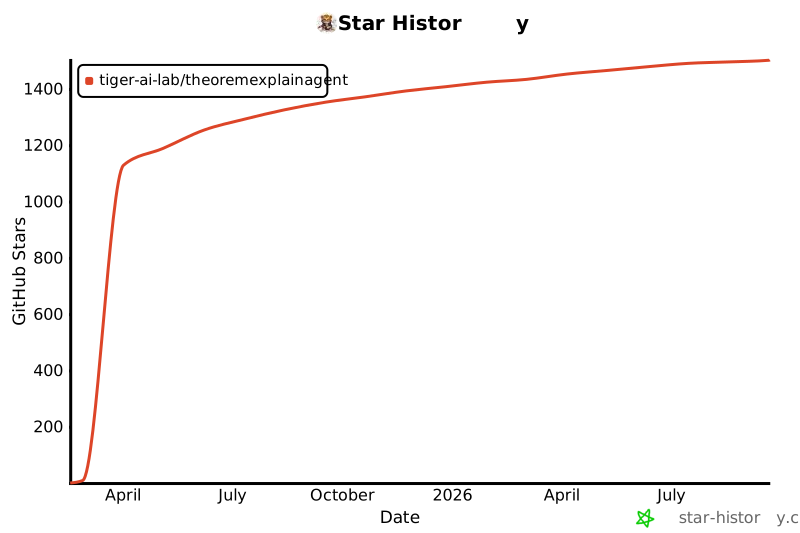
## ⭐ Star History
[](https://star-history.com/#TIGER-AI-Lab/TheoremExplainAgent&Date)
## 💞 Acknowledgements
We want to thank [Votee AI](https://votee.ai/) for sponsoring API keys to access the close-sourced models.
The code is built upon the below repositories, we thank all the contributors for open-sourcing.
* [Manim Community](https://www.manim.community/)
* [kokoro-manim-voiceover](https://github.com/xposed73/kokoro-manim-voiceover)
* [manim-physics](https://github.com/Matheart/manim-physics)
* [manim-Chemistry](https://github.com/UnMolDeQuimica/manim-Chemistry)
* [ManimML](https://github.com/helblazer811/ManimML)
* [manim-dsa](https://github.com/F4bbi/manim-dsa)
* [manim-circuit](https://github.com/Mr-FuzzyPenguin/manim-circuit)
## 🚨 Disclaimer
**This work is intended for research purposes only. The authors do not encourage or endorse the use of this codebase for commercial applications. The code is provided "as is" without any warranties, and users assume all responsibility for its use.**
Tested Environment: MacOS, Linux
|